


Venue - Relaxing Design Games
4.62.82K Reviews
App Specs
- Version
- 1.29.0
- Updated On
- License
- Free
- Downloads
- 1,000,000+
- Developer
- Superbloom
- Categories
- Simulation
- Platform
- Android
Screenshots

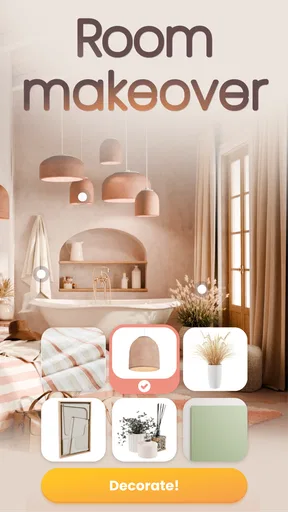
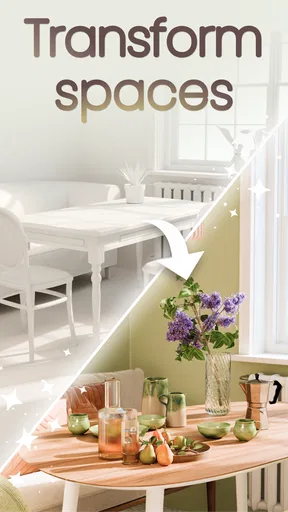


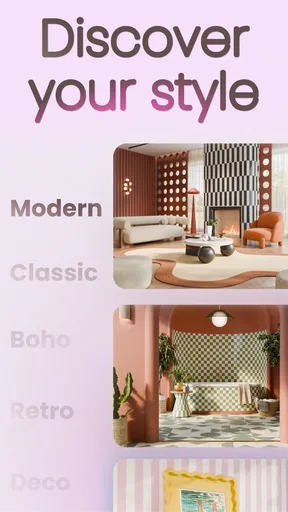

 Analysis by AppCompare
I like decorating games most when they give me a small, clear problem to solve rather than an endless catalog to browse. Venue - Interior Design Games is built around that appeal: I start with a room, make choices about its look, and get the satisfaction of turning a bare space into something that feels considered. It works best as a relaxed creative activity, not as a serious blueprint for furnishing a real home.
A quick project is an easy way in
My first useful approach is to treat each room as a design prompt, not as a test I have to ace. I look at the brief, decide on one main idea—perhaps a calm palette or a more playful mix—and make the larger choices before worrying about small decorative touches. That order helps keep the process enjoyable when the available options feel plentiful.
This also makes the game easier to pick up in short bursts. If I only have a few minutes, I can focus on one decision, such as the room’s overall color direction, then come back to the finer details later. I wouldn’t open it expecting a deep architectural tool or a precise way to plan furniture dimensions for my actual apartment; its appeal is the creative room-design activity itself.
What the design loop feels like
The basic rhythm is simple: I respond to a room brief, try out furnishings and decor, and see how the arrangement comes together. The immediate visual feedback is the rewarding part. A change in color or placement can shift the mood of the whole room, so experimenting feels more meaningful than simply scrolling through items.
When I get stuck, I find it useful to change one thing at a time rather than replace several choices at once. That makes it easier to see what is helping and what is pulling the room away from the idea I had in mind. It also gives a project a natural stopping point: once the main elements feel coherent, I can leave it there instead of endlessly tinkering.
Who will enjoy it—and who may not
I’d recommend this kind of play to anyone who likes visual puzzles, home styling, or making small creative decisions without the pressure of a real renovation. It can suit a quick break after work, a quiet evening activity, or a way to explore color combinations when you’re not ready to buy anything for your home.
It’s a weaker fit if you want a management simulation with complex resource planning, a realistic home-measurement tool, or a game built around fast action. The design focus is the point, and players who don’t enjoy choosing between visual options may find that loop repetitive. If you want practical planning, a dedicated room-measuring or floor-plan app is a better companion; if you want open-ended building, a construction-focused game will likely give you more control over the structure.
Worth Reading Before You Choose

EA SPORTS FC Mobile 26 Is a Bigger Football Game, but It Takes Time

Flipboard Shows What News Apps Must Do Beyond the Feed

Switching to Android Auto Means Rethinking Your Driving Routine

Google Calendar Makes a Crowded Week Easier to Manage

Ludo King Makes the Most of the Minutes Between Plans

Baby Panda World Brings Quick Play to Modern Phones, but Its Game Library Feels Busy
Small choices that make sessions smoother
A practical trick is to pick a focal point before filling the room. I decide which item or area should draw the eye, then choose supporting pieces that don’t compete with it. This gives a design a clearer direction and prevents the common trap of adding attractive items until the room feels crowded.
I also try to separate “this looks good to me” from “this answers the brief.” In a challenge, those goals can overlap, but they aren’t always identical. Checking the prompt again before I finish helps me avoid spending time polishing a look that has drifted away from the requested style. That small pause is especially useful when I’ve been experimenting freely.
If you’re using the game for real-world inspiration, treat the finished room as a mood reference rather than a shopping plan. A pleasing combination can suggest a palette or a general style, but a mobile design scene isn’t a substitute for checking actual room size, comfort, materials, or cost. I find it most useful for clarifying what I like before making real decisions.
Getting Started with Venue
From the moment you open Venue - Interior Design Games, you’re greeted with a user-friendly interface that’s both intuitive and engaging. The app doesn’t waste any time getting you into the thick of things. After a brief tutorial that walks you through the basics, you’re ready to dive into your first design challenge.
The app offers a variety of rooms and styles to choose from, ranging from cozy living rooms to sleek modern kitchens. Each project starts with a blank canvas, and it’s up to you to bring it to life. The sheer number of options for furniture, decor, and color schemes can be overwhelming at first, but trust me, it’s a designer’s paradise.
Design Challenges and Creativity
One of the coolest features of Venue is its design challenges. These challenges push you to think outside the box and get creative with your designs. You might be tasked with designing a minimalist bedroom or a bohemian living room, and the possibilities are endless.
What I love most is the freedom to experiment. You can mix and match items, play with different textures, and really let your creativity shine. The app provides a vast library of items, and each piece can be resized, rotated, and placed with precision. It’s like having a digital sandbox where the only limit is your imagination.
Community and Interaction
Venue also has a vibrant community of fellow designers. You can share your creations, get feedback, and even participate in design competitions. This social aspect adds a layer of interaction that makes the app even more engaging.
The community is supportive and inspiring. Seeing other users’ designs can spark new ideas and help you refine your style. Plus, it’s always fun to see how others interpret the same design challenge in completely different ways.
Graphics and Realism
Now, let’s talk about the graphics. The attention to detail in Venue is truly impressive. The textures, shadows, and lighting effects give your designs a level of realism that’s rare in mobile games. It’s almost like you’re looking at a photograph of a real room.
This realism makes it easier to visualize how certain combinations of furniture and decor will look in a real-world setting. Whether you’re planning a home renovation or just playing for fun, Venue gives you a taste of what it’s like to be a professional interior designer.
Why You Should Try Venue
So, why should you give Venue a shot? Well, for starters, it’s incredibly satisfying to see your design ideas come to life. The app is perfect for anyone who loves decorating, whether you’re a novice or a pro. It’s also a great way to unwind and tap into your creative side.
If you’re tired of the same old mobile games and want something that challenges your creativity, Venue is definitely worth checking out. Not to mention, it’s a fantastic way to explore different design styles and get inspiration for your own space.
In conclusion, Venue - Interior Design Games is more than just a game; it’s a creative outlet. It’s a chance to explore your design potential, connect with a community of like-minded individuals, and have fun while doing it. If you’ve got a flair for design or just love beautiful spaces, this app is a must-try.
Ready to start designing? You can download Venue on both Android and iOS platforms. Trust me, you won’t regret it!
How it compares with other decorating games
Compared with the usual room-design games, this one is most appealing when you want the design decisions to be the activity rather than a side task in a larger story or business simulation. Some decorating games make progression feel tied to managing customers, currency, or a renovation narrative. Venue’s room challenges put the visual brief at the center, which is a better match for a player who wants to try styles and see the result without treating every session like a management exercise.
That focus has a trade-off. Players who enjoy unlocking a long chain of rooms through elaborate objectives may prefer a game with more emphasis on progression systems. Venue is easier to approach as a creative pastime, but the pleasure depends on whether arranging a room is engaging on its own. I would choose it for a low-pressure design break, not when I’m looking for a broad simulation with many layers of strategy.
A realistic way to fit it into the day
Imagine having a short pause between chores or waiting for someone to arrive. I can open the game, take on one room brief, settle on a color direction, and spend the remaining time adjusting the layout. The useful part is that I can stop when the room has a clear visual idea; I don’t need to turn a quick break into a long session. If I return later, I can look at the design with fresh eyes and spot a choice that feels too busy or out of place.
For a shared activity, I’d use a challenge as a conversation starter rather than assume everyone will agree on a final design. One person can favor a restrained look while another wants stronger colors, and comparing those choices is part of the fun. That makes the game suitable for a casual creative moment with a friend or family member, though it won’t replace a collaborative planning app if several people need to coordinate a real renovation.
What to know before spending time or money
The game is free to start, and it is rated for Everyone. Superbloom is the developer, and the title sits in the simulation category, though its most immediate pleasure is the hands-on decorating. It has a 4.6 average from around 97,000 ratings and has passed one million installs. Those figures suggest that the room-design format has found a sizable audience, but they don’t guarantee that its pace or style will suit every player.
The current version is 1.22.0, and it runs on Android 9 or later. In-app purchases range from $0.99 to $179.99 per item, so I’d decide in advance whether I’m happy to play casually without buying anything or whether I’m willing to spend on optional content. Those prices are a wide range, and the sensible approach is to check each purchase carefully rather than assume every item or option costs the same.
A common question is whether this is useful for someone who has never studied interior design. I think so, because the challenge format gives you a concrete starting point and experimentation is part of the appeal. You don’t need to arrive with a polished personal style; trying combinations is a way to discover what you like. The other side of that is that the game is not a course in professional design, so I wouldn’t expect it to teach technical planning or construction knowledge.
Another question is whether it can help with an actual room at home. It can help me explore a mood, compare broad color ideas, or articulate why I’m drawn to a certain look. I would still check real measurements, materials, lighting, and budget separately before acting on any idea. The game is best used at the inspiration stage, where trying a visual direction is useful and low stakes.
Where the loop succeeds—and where it can tire
The loop works because each decision produces visible feedback: I choose, inspect the room, adjust, and reach a point where the design feels finished enough to move on. The reward is less about a complicated system and more about seeing a brief take shape through my choices. A new challenge can then restart that process with a different style problem, giving me a reason to return without requiring a marathon session.
Its main limitation is also tied to that simplicity. If I want fast action, deep simulation, or strict practical guidance for furnishing a home, I’m better off elsewhere. And if I keep changing details after the room already feels coherent, the session can turn into aimless tweaking. Setting a small goal—such as deciding the palette or completing one challenge—keeps the experience focused.
For me, Venue is worth trying when I want a gentle, visual game that lets me make choices and immediately see their effect. Its best use is not to promise a perfect real-world room, but to offer a compact space for testing taste, responding to a design prompt, and ending a short session with something I shaped myself.
Pros
- Realistic 3D design tools enhance creativity.
- User-friendly interface for easy navigation.
- Wide variety of furniture and decor options.
- Regular updates with new design challenges.
- Community features for sharing and inspiration.
Cons
- Requires internet connection for most features.
- In-app purchases can be expensive.
- Occasional bugs during design rendering.
- Limited free content without subscription.
- Some design items locked behind paywall.
FAQs for Venue - Relaxing Design Games
What is Venue - Interior Design Games about?
Venue - Interior Design Games is an engaging app that allows users to unleash their creativity by designing and decorating virtual spaces. The game offers a variety of furniture, color schemes, and styles. It's perfect for anyone interested in interior design or looking for a fun and relaxing way to express their creativity.
Is Venue - Interior Design Games free to play?
Yes, Venue - Interior Design Games is free to download and play. However, it offers in-app purchases that provide additional features, items, or currency. These optional purchases can enhance your gaming experience, but are not necessary to enjoy the core gameplay.
What are the system requirements for Venue - Interior Design Games?
Venue - Interior Design Games requires a smartphone or tablet running on Android 5.0 or iOS 10.0 and above. A stable internet connection is recommended for downloading updates and accessing online features. Ensure your device has sufficient storage space for a smooth gaming experience.
Can I play Venue - Interior Design Games offline?
While some features of Venue - Interior Design Games may be available offline, the full experience requires an internet connection. This is particularly important for accessing community features, downloading new content, and participating in design challenges with other users.
How does the social aspect of Venue - Interior Design Games work?
Venue - Interior Design Games includes social features that allow you to connect with other players. You can share your designs, participate in community challenges, and vote on others' creations. This interactive element adds a competitive edge and fosters a community of design enthusiasts.


